
Need to stop your plan? You can cancel any time from the Account & Billing area — your subscription stays active until the end of the current billing period.
STEP 1
Open Account & Billing
- Sign in to DiscoveryEZ.
- In the bottom-left sidebar, click Account & Billing.
- The Settings page opens with five tabs at the top.
STEP 2
Switch to the Billing tab and open the portal
- Click the Billing tab. You’ll see two panels: Usage (pages and characters processed) and Subscription (plan and billing portal access).
- Under Subscription, click the Open billing portal button.
- A new tab opens with the secure Stripe billing portal — DiscoveryEZ’s billing partner.
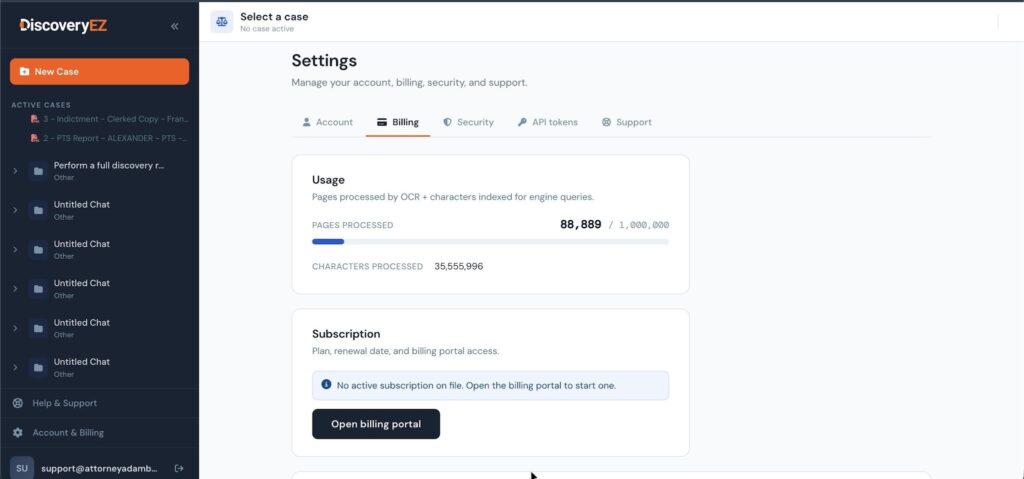
The Subscription panel on the Billing tab — click Open billing portal to continue.
STEP 3
Click Cancel subscription
- In the Stripe portal, find your plan under CURRENT SUBSCRIPTION (e.g. “Pro (Solo) Plan — US$149.00/month”).
- Click the Cancel subscription button on the right.
- Confirm the cancellation on the next screen. Stripe will email you a confirmation.
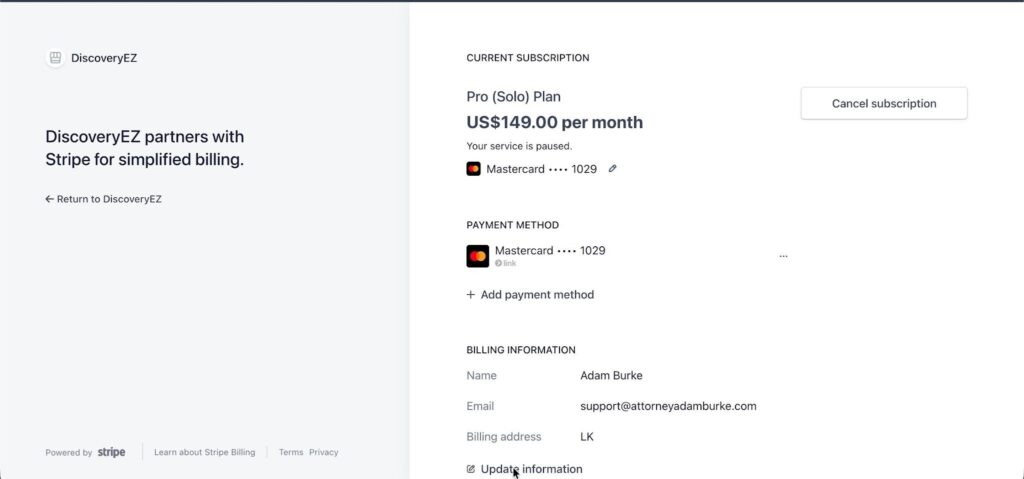
Cancel subscription sits to the right of your current plan in the Stripe portal.
What happens after you cancel: Your plan stays active until the end of the current billing period — you keep full access until then. You will not be charged again. After expiry, your cases remain stored read-only; resubscribe any time to restore full access.
STEP 4
Return to DiscoveryEZ
- Click ← Return to DiscoveryEZ in the top-left of the Stripe portal to go back to your account.
- Your Billing tab will reflect the cancellation within a few minutes.
✨ YOU’RE DONE!
Your subscription is cancelled. Reach out to support any time if you need a hand or want to reactivate.
Changed your mind?You can resubscribe at any time. Reopen the billing portal from Account & Billing › Billing and pick a plan — your case data and chat history will be waiting for you.